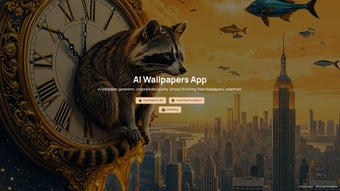

Download AiWallz – AI‑Powered Wallpaper Generator, Free & Secure
Overview of AiWallz
AiWallz is a cutting‑edge web application that brings artificial intelligence to the world of desktop and mobile wallpapers. Built for creators, designers, and anyone who loves to personalize their screens, AiWallz leverages a deep‑learning image generator to produce an endless stream of high‑resolution backgrounds. Whether you are looking for minimalist gradients, abstract textures, or themed collections such as the beloved “Racoon Wallpapers,” the platform’s algorithm continuously crafts fresh visuals that match a wide spectrum of aesthetic preferences.
The service is completely browser‑based, which means you can generate, preview, and download wallpapers without installing heavyweight software. Security and privacy are baked into the platform: all image processing happens on secure servers, and no personal data is stored beyond the brief session needed to deliver your download link. AiWallz also offers “Smart AI art generator agents” that specialize in creating intricate patterns and textures, giving you a level of customization that traditional wallpaper sites simply cannot match.
In short, AiWallz is a free, secure, and always‑up‑to‑date tool that turns AI creativity into beautiful, ready‑to‑use backgrounds for Windows, macOS, Android, and iOS devices. Its intuitive interface, combined with AI‑driven creativity, makes it suitable for both casual users who want a quick aesthetic boost and power users who enjoy fine‑tuning every visual element. Because the entire workflow runs in the cloud, updates are instant and you always benefit from the latest AI models without manual patches or downloads.
Key Features that Set AiWallz Apart
- AI‑Driven Image Generation – Real‑time creation of unique wallpapers using state‑of‑the‑art neural networks.
- Vast Design Catalog – Thousands of pre‑generated images spanning abstract, nature, sci‑fi, and more.
- Racoon Wallpaper Collection – A curated set of high‑quality raccoon‑themed backgrounds for animal lovers.
- Smart AI Art Generator Agents – Specialized agents that focus on texture, pattern, and color harmony.
- Resolution‑Aware Export – Automatic sizing for 4K monitors, Full HD displays, and mobile screens.
- One‑Click Download – Secure, direct download links without registration or ads.
- Cross‑Platform Compatibility – Wallpapers ready for Windows, macOS, Android, iOS, and Linux.
- Regular Updates – New AI models and design trends added monthly to keep the library fresh.
- Free & Open Access – No hidden fees; premium features are optional and clearly marked.
The combination of these features makes AiWallz more than just a wallpaper repository; it is an interactive design studio that adapts to your personal taste. The AI engine learns from the millions of images it has been trained on, allowing it to blend styles in ways a human designer might take hours to achieve. For example, you can request a “neon‑glow forest” or a “retro‑pixel raccoon” and receive a tailor‑made wallpaper in seconds.
The platform’s “Smart AI art generator agents” also let you fine‑tune parameters such as color palette, texture density, and contrast, giving you creative control without the steep learning curve of professional graphics software. Moreover, the free tier provides unlimited downloads, making it an ideal solution for students, freelancers, and anyone who wants to keep their device’s look fresh without breaking the bank. Each generated image is optimized for fast loading while preserving detail, and the built‑in export options let you choose between PNG for lossless quality or JPG for smaller file sizes.
The seamless integration of AI creativity with practical export tools ensures that you get both artistic flair and technical reliability in every wallpaper you download.
How to Install and Use AiWallz on Any Device
Step‑by‑Step Installation
- Open your preferred web browser (Chrome, Firefox, Safari, Edge) and navigate to AiWallz.com.
- Click the “Generate Wallpaper” button on the homepage. No download or installation is required because the service runs entirely in the cloud.
- Choose a category (e.g., “Racoon Wallpapers,” “Abstract Textures”) or enter a custom prompt in the search bar.
- Adjust optional settings such as resolution, color scheme, and texture depth using the side panel.
- Press “Create” – the AI will process your request and display a preview within 5‑15 seconds.
- When satisfied, click “Download” to save a high‑resolution PNG or JPG file to your device.
Usage Tips for Different Operating Systems
Windows & macOS: After downloading, right‑click the image and select “Set as Desktop Background.” For multi‑monitor setups, use the display settings panel to assign different AiWallz images to each screen.
Android & iOS: Save the image to your photo gallery, then open the device’s wallpaper settings and choose the saved picture. Both platforms support lock‑screen and home‑screen assignments.
Linux (GNOME, KDE): Place the downloaded file in your Pictures folder and use the system’s “Appearance” settings to apply it.
Because AiWallz is web‑based, it works on any device with an internet connection, including tablets and smart TVs. The platform automatically detects your screen resolution and offers the optimal size, but you can also manually select custom dimensions if you need a banner for a website or a social‑media header. The service is secured with HTTPS encryption, ensuring that your download links cannot be intercepted.
If you encounter any issues, the “Help” icon in the lower‑right corner opens a live chat with the support team, which is available 24/7 for troubleshooting and guidance. For power users, the advanced settings panel provides access to AI seed values, enabling reproducible results for branding projects or thematic collections. Finally, remember to clear your browser cache occasionally to guarantee that you always receive the most recent AI model updates and design assets.
Pros, Cons, Frequently Asked Questions, and Final Verdict
Pros
- Completely free for unlimited downloads.
- AI generates truly unique wallpapers every time.
- No software installation; works directly in the browser.
- High‑resolution outputs suitable for 4K and Retina displays.
- Specialized collections (e.g., Racoon Wallpapers) for niche interests.
- Secure HTTPS connection and no data retention.
Cons
- Requires an internet connection; offline generation is not available.
- Advanced customization options may be overwhelming for beginners.
- Premium AI models (if released) could introduce a paid tier.
Frequently Asked Questions
Is AiWallz really free?
Yes, the core wallpaper generation and download features are completely free. There are optional premium tools that may be introduced in the future, but the basic service remains free for unlimited use.
Do I need to create an account?
No account is required. All you need is a modern web browser and an internet connection.
Can I use the wallpapers for commercial projects?
AiWallz’s license allows personal and commercial use of the generated images, provided you do not resell them as standalone assets. Always check the specific licensing terms displayed on the download page.
What resolutions are supported?
The generator offers standard resolutions (1080p, 1440p, 4K) and also lets you input custom dimensions up to 8192 × 8192 pixels.
Is my data safe while using AiWallz?
Yes. All communications are encrypted via HTTPS, and the platform does not store personal information after the session ends.
Final Verdict – Should You Download AiWallz?
AiWallz stands out in the crowded wallpaper market by delivering AI‑generated art that feels both fresh and highly personalized. The absence of mandatory sign‑ups, the zero‑cost model, and the seamless browser experience make it an attractive choice for anyone who wants to keep their devices looking modern without investing time or money in graphic design software. While the reliance on an internet connection may be a limitation for offline users, the trade‑off is a virtually limitless library that updates daily. In short, if you value creative freedom, high‑resolution quality, and a secure, ad‑free environment, AiWallz is a download you won’t regret.
Ready to transform your screens? Click here to start generating stunning AI wallpapers now and enjoy a fresh visual experience every day.



.png)



